NanoTorrent

NanoTorrentA tiny, hackable
BitTorrent client

NanoTorrent is a pure-Rust port of PicoTorrent — the same lean application, rebuilt without a single C++ dependency, now on Windows, macOS and Linux. One Slint window everywhere, dark mode, a built-in web remote, and it reads your existing PicoTorrent settings on first run.

Written in Rust 2024 Windows · macOS · Linux Slint UI Dark mode DHT · PeX · MSE/PE uTP · LSD · web seeds BitTorrent v1 · v2 · hybrid Built-in web remote Headless mode Stream while downloading Rhai plugins Strict network mode 76 languages

Windows installer Microsoft Store macOS disk image Debian / Ubuntu .deb Fedora / RHEL .rpm Linux AppImage

Windows 10 / 11 · macOS · Linux

A look inside

One window, three platforms

The desktop client is drawn by Slint, so Windows, macOS and Linux get the same window rather than three approximations of it — and the web interface it ships with follows the same theme and the same language.
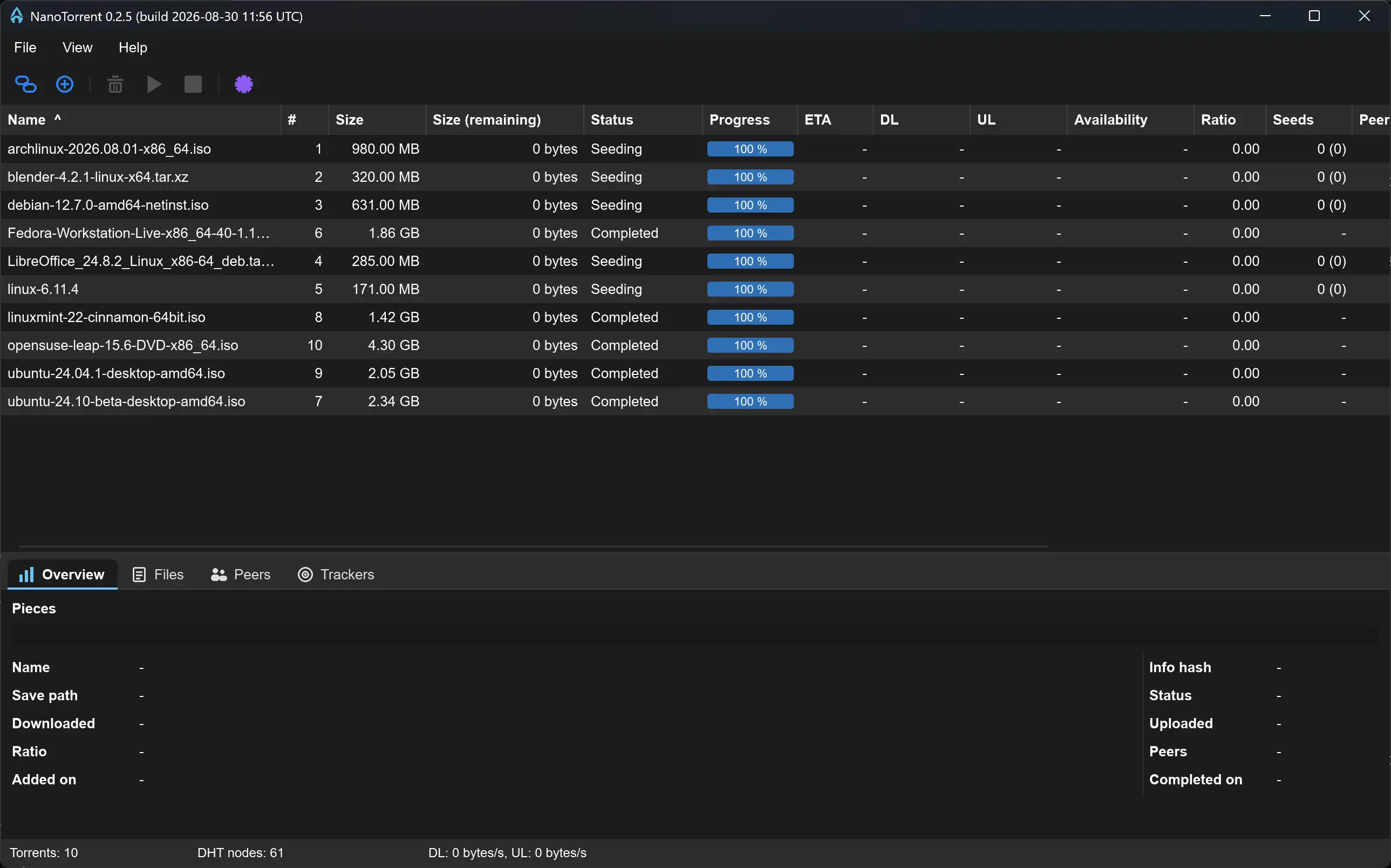
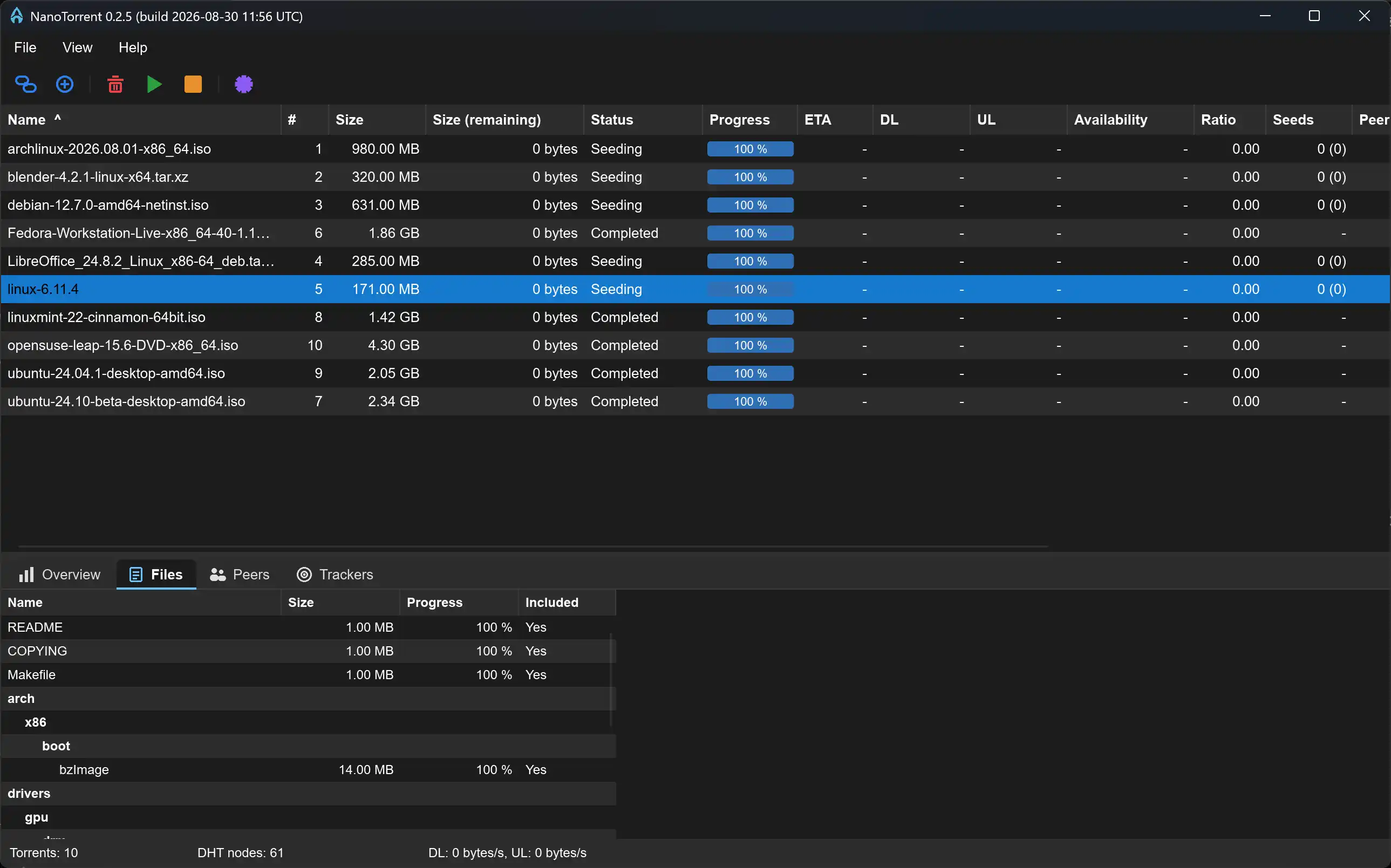
The NanoTorrent main window in its dark theme
The main window. The torrent list with all 16 columns and a rendered progress bar, the icon toolbar above it, and the details panel below. Everything here is drawn by Slint, so it is the same window on Windows, macOS and Linux.
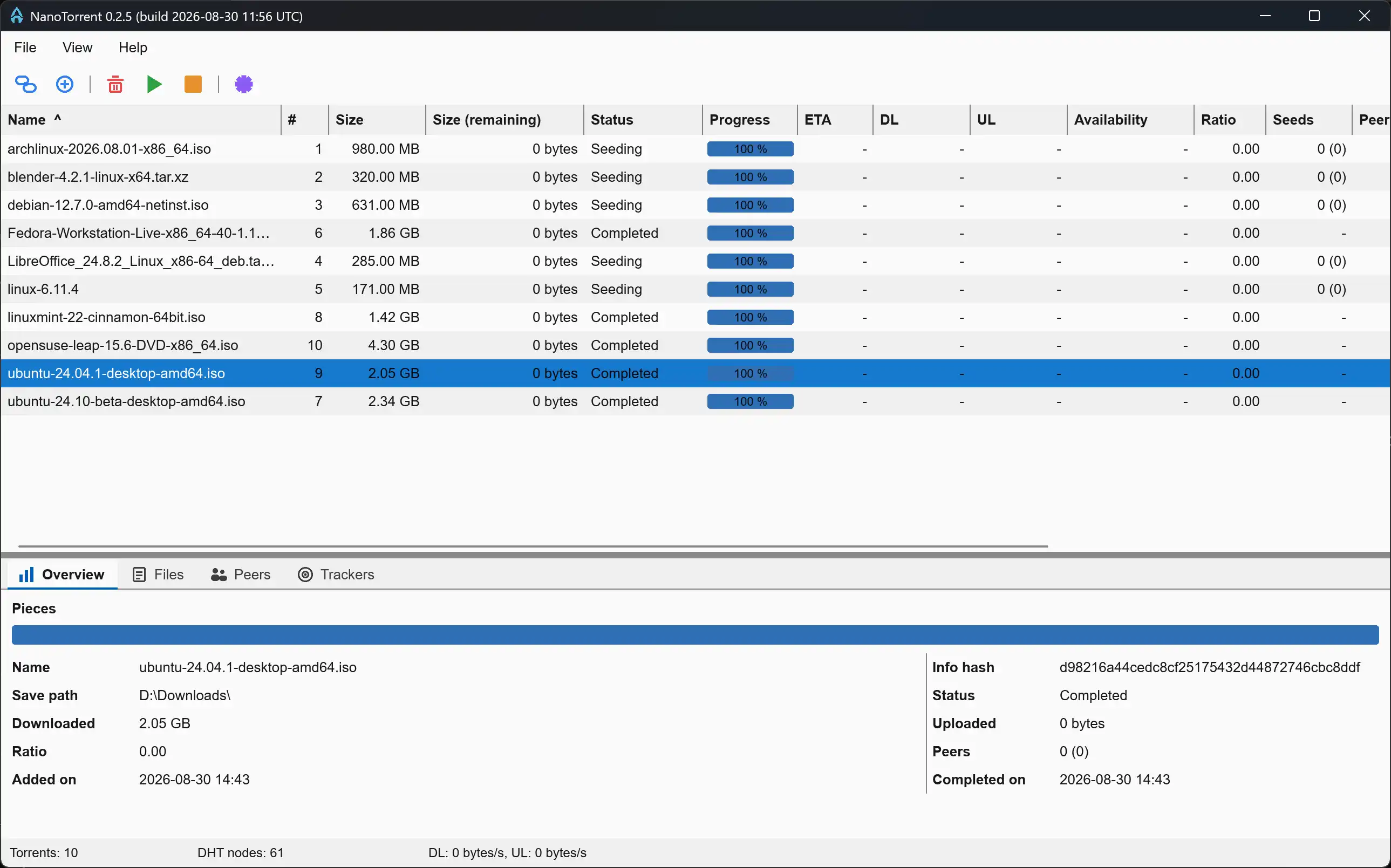
The main window in its light theme
Light theme. Follows the OS by default, or is pinned in Preferences. The toolbar glyphs are drawn rather than shipped as images, so one set works on both palettes.
The Files tab of the details panel
Details ▸ Files. A real tree: folders that fold, the connector lines a file manager draws, and an icon per file type. Per-file size, progress, include toggle and priority; Peers — with GeoIP country and flag — and Trackers sit beside it.
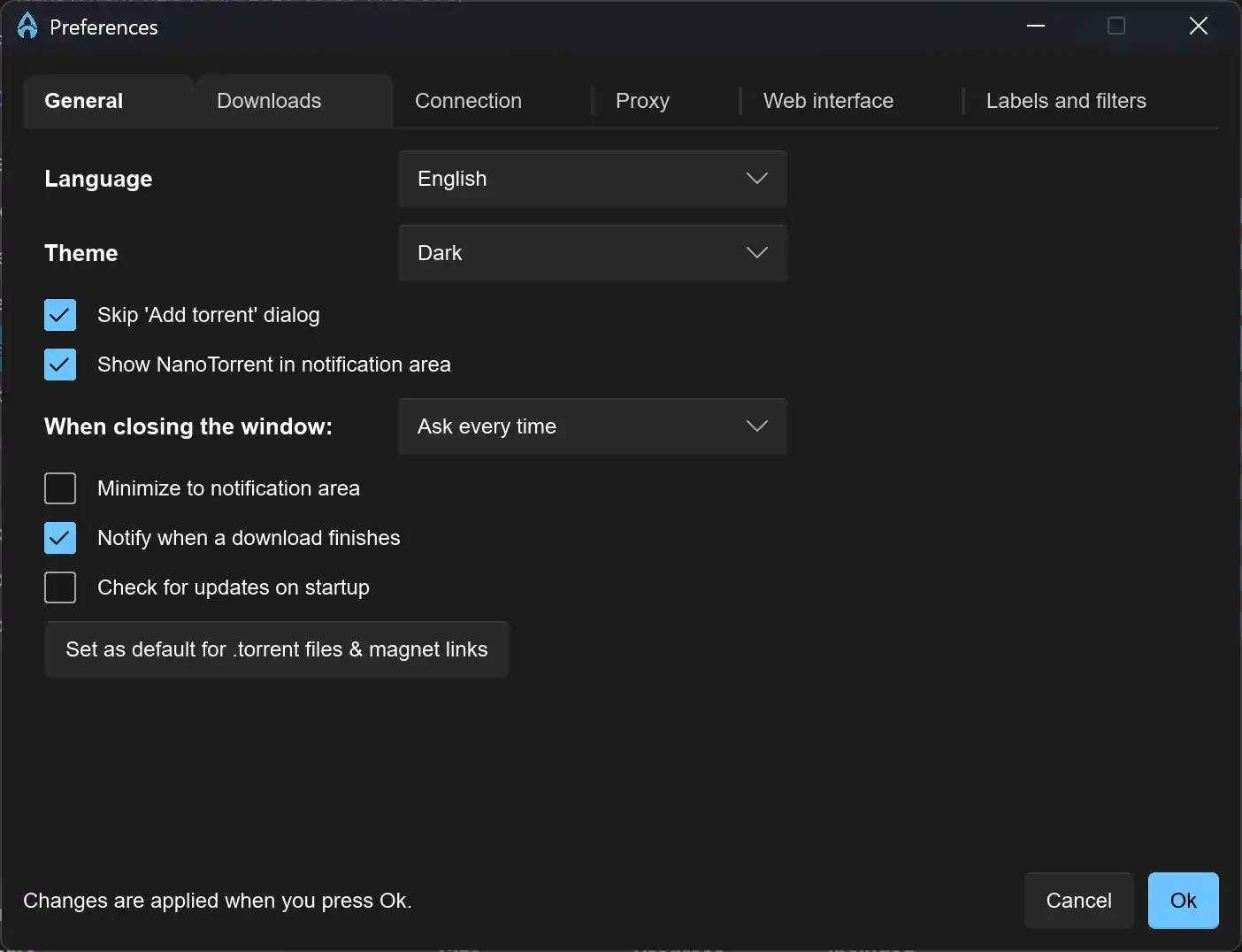
The Preferences dialog
Preferences. Six tabs, applied live on OK: the session is rebuilt rather than requiring a restart, so rate limits, DHT, PeX, encryption and the proxy take effect at once.
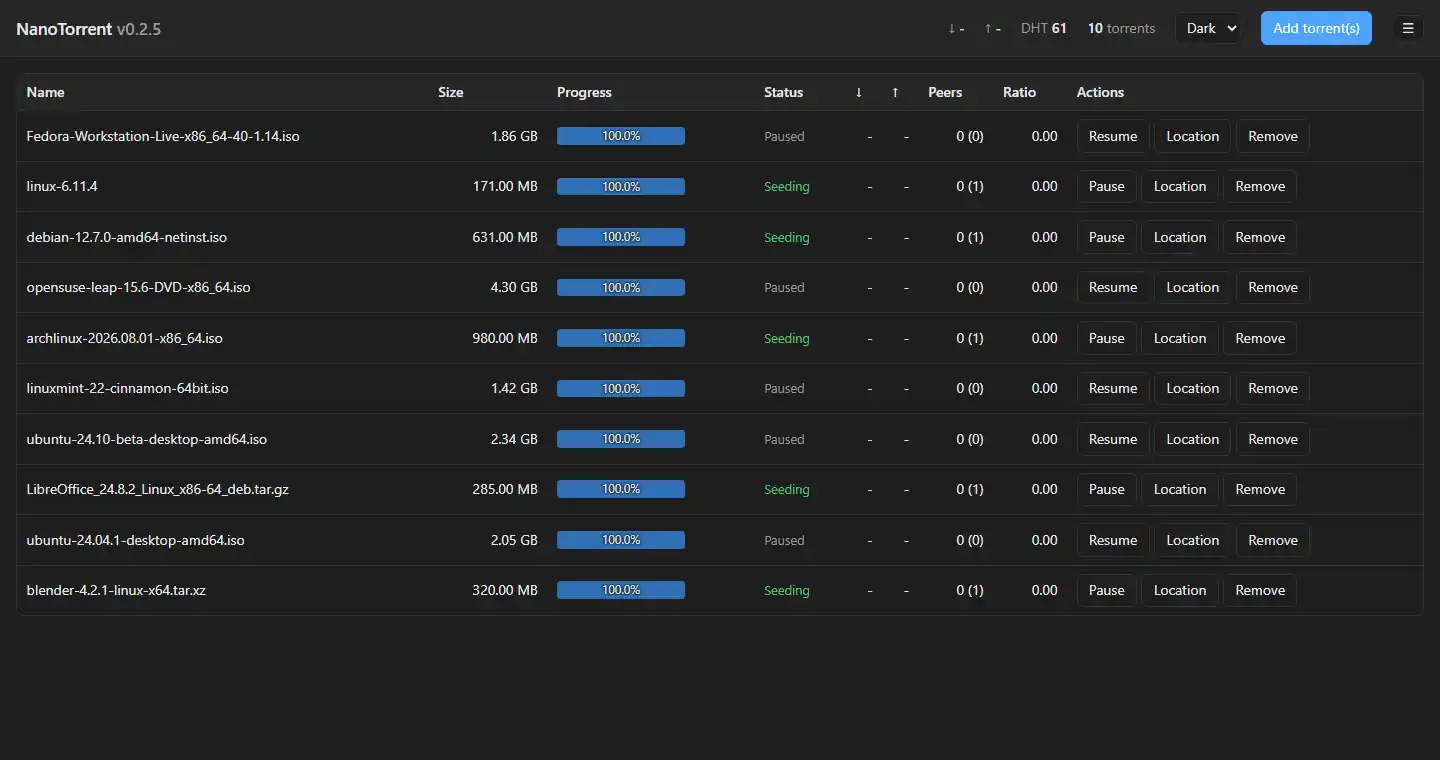
The built-in web interface in its dark theme
The web interface. An authenticated HTTPS remote that ships in the binary, and it now draws what the app draws: the same file trees with the same icons, tabbed Details, and a toolbar that folds into the menu as the window narrows rather than wrapping.
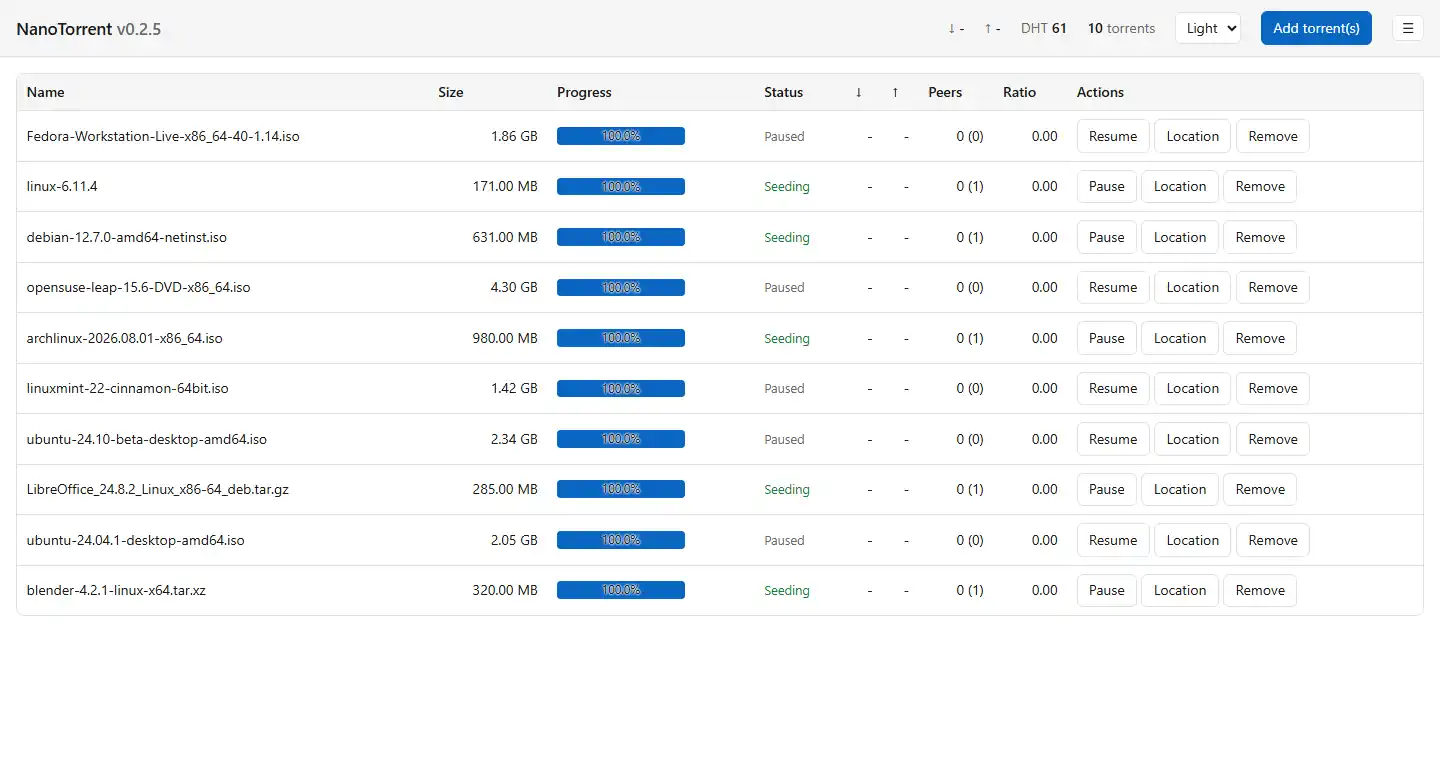
The web interface in its light theme
It follows the theme too, and renders in the configured language — substituted server-side, so there is no flash of English and no second request.
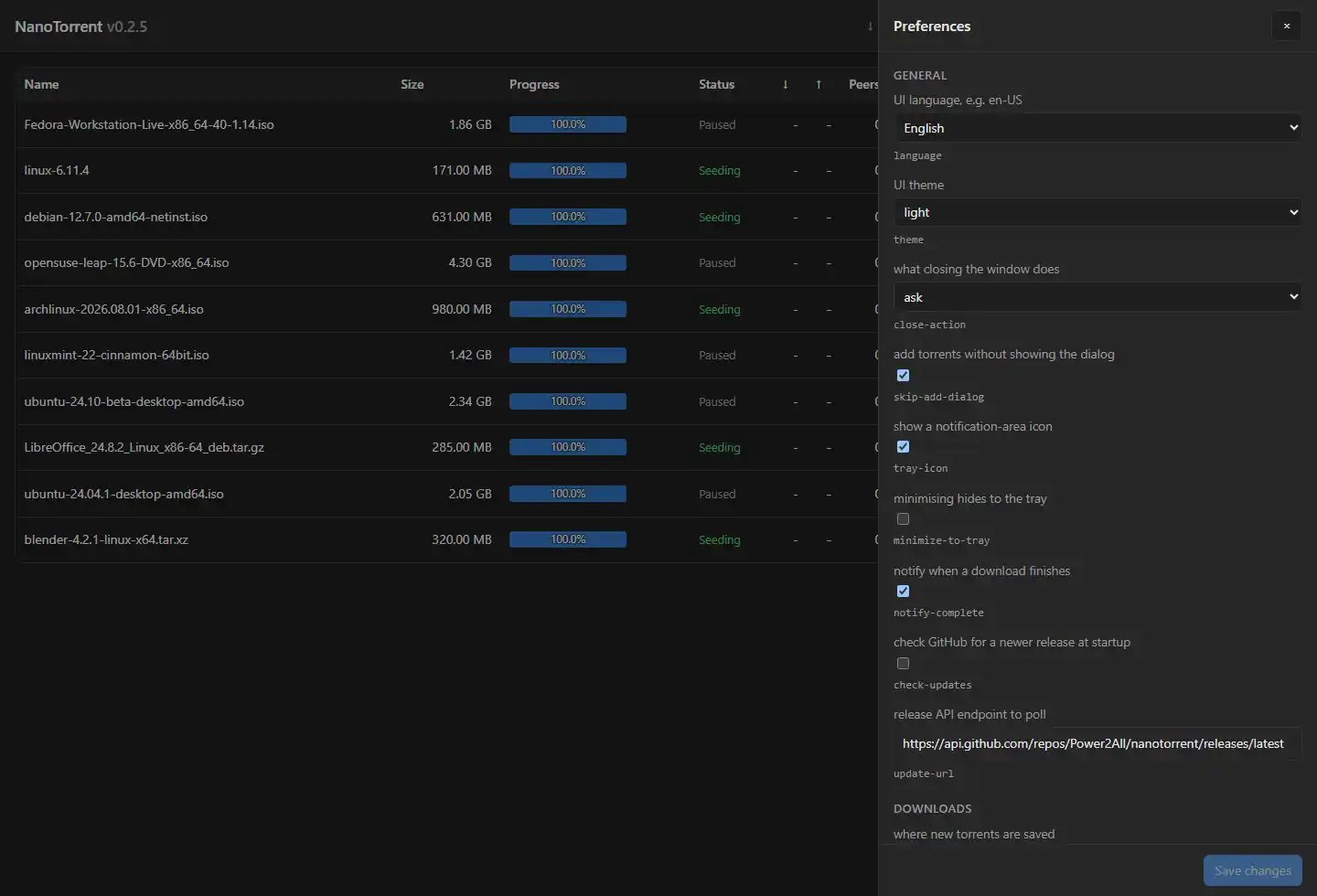
The web interface Preferences drawer
The same settings, remotely. The drawer behind the hamburger is generated from the command line’s settings registry, so the desktop dialog, the terminal and the browser share one list, one set of types and one validator.

The torrents shown are Linux distribution images, used as sample data.

New in 0.4.1

What’s new

0.4.1 is the polish on 0.4.0, which was the big one: streaming a file while it downloads, plugins that can start a program, and a file list that is finally a tree.

Your ratio survives a restart It reset when you changed a setting or closed the client, which made a share limit set on ratio quietly unenforceable — the number it watches went back to zero before it ever got there.
The web interface could not change anything over HTTPS Every button came back refused. The cross-site check added in 0.4.0 reads the Host header, and a modern browser talking HTTP/2 does not send one — it sends :authority instead. So the check that keeps other sites out was keeping you out. It reads both now.
Seven more video players, and only the ones you have Media Player, MPC-HC, PotPlayer, SMPlayer, Celluloid, IINA and Elmedia Player join VLC and mpv in the shipped player.rhai. The list offered is the list found on your system, and one that cannot be located asks you where it is rather than failing silently.
Questions before the irreversible ones Removing a torrent, and changing or removing a tracker, ask first — and each question can be answered once and remembered, so the confirmation is there the first time and gone the hundredth. Importing from PicoTorrent asks too, can clear the current list and bring its settings over, and reports what arrived, what was already here and what failed.
Trackers are announced by tier, as the torrent asked A backup tracker is kept as a backup rather than announced to alongside the primary — which is what a tier is for, and what the torrent’s author meant by writing one.
The build is reproducible The timestamp is no longer compiled in — it is read from the executable’s own date — and the linker writes a fixed one into the PE header. Two builds of the same source are now byte-identical, so a download can be checked against a hash you worked out yourself rather than one we handed you.
0.4.0: stream a file to a player while it downloads The web interface serves byte ranges out of a file that has not finished, and the Files tab grows a Play button and a Copy stream URL for the files worth streaming. Seeking works on a partial download: the reader blocks on the piece under the read head and the engine fetches it. NanoTorrent launches nothing itself — the URL goes to whatever plays it.
0.4.0: plugins can start a program, on a leash execute is the eleventh permission and reads last in the approval prompt for a reason: it is reach over the machine rather than over your torrents. Every run and open is logged with the program and its arguments before the process starts, and nothing is shelled out, so a filename out of a torrent cannot become a second command. The shipped player.rhai is the proof — right-click a file, play it in your player — and it arrives switched off. The API is written up here ▸
0.4.0: the file lists became trees Both of them — the Files tab and the Add torrent dialog — indented their rows, which said how deep a file was but not what it sat in. They now draw the connectors a file manager draws, fold at every folder, and carry an icon per type: video, audio, image, archive, disc image, document, subtitles, program, code. The web interface’s two lists showed full paths and are trees as well. Folding is a view, not a choice: a file inside a shut folder keeps whatever it was set to.
0.4.0: fifteen more plugin calls, and plugins that translate themselves The file list, the peer list, trackers and tracker editing, share limits, queue moves, per-file priorities, set_location, add_torrent_file and stream_url — closing the gap against what an authenticated web client could already do. A plugin’s strings now live in a catalogue beside its script, so all three shipped examples carry no English at all and each ships translations for every one of the 76 languages.
0.4.0: five security fixes, and six crates out of the build Cross-site requests can no longer change anything; a torrent can no longer name a Windows drive as its folder; a torrent filename can no longer inject a line into the playlist handed to a media player; a request carrying no credentials no longer counts toward the brute-force lockout, which used to let a port scan lock the owner out; and the proxy password is no longer read back over HTTP. Meanwhile axum left the build — NanoTorrent never served a route on it, but two declarations in the vendored librqbit pulled the whole framework in.
0.4.0: the keyboard works Up and Down move the selection in the torrent list and the Files tab, Home and End jump to the ends, and Enter or Space folds the folder you are on. Right-clicking a file always opens a menu now, starting with Open file — before this it existed only if a plugin had put something in it, so with no plugins a right-click did nothing at all.
What you get

Everything the original did — and then some

The full PicoTorrent feature set, ported across: settings database, translations, layout and all. Plus two things it never had — three platforms, and a web interface.

Windows, macOS and Linux

The front end was rebuilt on Slint, so it is one window and one codebase on all three. Ships as an .exe installer, a .dmg, .deb and .rpm packages, and an AppImage that needs no install at all — or install it from the Microsoft Store.

Built-in web interface

An Actix server over HTTPS — self-signed by default, Argon2id password hashing, a configurable per-address lockout that answers repeated failed logins with a 429, and it flatly refuses to listen off-loopback in plaintext. State arrives as a server-sent event stream rather than four polls a second, with an indicator that goes red and recovers on its own. It carries the desktop’s toolbar and speed charts, the same file trees with the same per-type icons, tabbed Details, multi-select, drag-and-drop adding, pagination with sorting that applies across every page, and a Preferences drawer holding every setting the desktop dialog has, in the configured language. The toolbar folds into the menu as the window narrows instead of wrapping onto more lines, and state names and background errors are translated rather than left in English.

Watch it before it finishes

The web interface serves byte ranges out of a file that is still downloading, so a Play button in the Files tab hands one file to whatever plays it. Seeking works on a partial download — the reader blocks on the piece under the read head and the engine goes and fetches it. The URL carries a capability token good for that one file for half an hour, never your password, and NanoTorrent launches nothing itself unless a plugin you approved does it for you.

Headless mode

Build with --no-default-features for no window at all — a seedbox daemon driven entirely through the web interface. And every preference the dialog offers is settable without one: --list-settings prints them all with their ranges, --get reads one, --set changes one.

Plugins, on a leash

Optional Rhai scripts react to session events and to a once-a-minute tick, and drive the session back through the web API’s own verbs. Eleven permissionsnetwork for a capped http_get, data for a store of their own, ui for a window and a menu, and execute to start a program. Each is declared in a one-line header read before the script runs, and the plugin gets an engine holding only what it asked for, so reaching past the grant fails with “function not found”. A plugin can draw a form, put items on a file’s context menu, carry its own icon, and ship its own translations. Off by default; an RSS auto-downloader and a media-player launcher ship as working examples. Write one ▸

Share limits & scheduling

Stop seeding at a ratio, after a number of minutes, or whichever comes first — then pause or remove. Global, overridable per torrent, and off by default. Alternative speed limits run on a schedule, with a turtle in the toolbar for when you want them now.

Queue, priorities and tags

Top, up, down, bottom — from the toolbar or the context menu, with a multiple selection keeping its own order. Per-file priorities of skip, normal, high and maximum. And tags, many per torrent, where a label is one.

Watched & incomplete folders

Drop a .torrent into the watched folder and it is added, then renamed aside rather than deleted, so a misfire leaves the file where you can find it. Download into an incomplete folder and move to the save path when it finishes.

An encrypted settings file

The whole database, in pure Rust. The key lives in DPAPI on Windows and a 0600 file elsewhere — no password to type — and a change made outside NanoTorrent is detected rather than accepted. Settings, labels and filters export and import as JSON, with passwords and plugin permissions left out.

Live settings

DHT with a persisted routing table, UDP trackers, rate limits, SOCKS proxy with per-scope toggles, fast resume. Preferences ▸ OK rebuilds the session — no restart.

Strict network mode

Stop rather than leak. Turned on, it switches off whatever your VPN interface or SOCKS proxy cannot cover — DHT, uTP, local discovery, UPnP — refuses to start if the named interface is not there, and pauses every torrent if it vanishes while running. Interface binding works on Windows now too.

Live speed charts

Two of them in the toolbar, one per direction, each holding the last minute and riding the list’s own refresh tick rather than a timer of its own. Each scales to its own peak instead of a shared one, so upload is not flattened into a line along the bottom, and each states that peak in its tooltip. The web interface has the same pair.

The full torrent list

All 16 columns with a rendered progress bar, click-to-sort, multi-select, and the complete context menu: recheck, move storage, labels, tags, queue order, copy magnet, open in Explorer.

Details that matter

Overview with a piece-availability bar; a Files tree that folds, draws connectors and gives every row an icon from its type, with include toggles and priorities; peers with GeoIP country and flag; and trackers grouped into announce tiers — announced by tier, so a backup stays a backup — that you can add to, edit in place and remove, stored in the database and never written back into the .torrent. The whole list takes the keyboard.

Smart magnet adds

Magnet links fetch their metadata first, then show you the real file list in the same dialog you get for a .torrent — pick your files before it starts.

BitTorrent v2, not just the checkbox

v2-only .torrent files and v2-only magnets both download and seed, verified against their merkle piece hashes. No librqbit release implements BEP 52, so it is written here: the piece layers a magnet cannot carry are fetched with the v2 hash messages and checked against each file’s pieces root before a single byte of content is asked for. Incoming hash requests are now answered from those layers, so another client can bootstrap a v2 magnet from you. Hybrids announce under both info hashes at once.

The protocol, spelled out

Eighteen BEPs, fifteen in full: DHT, metadata exchange, the extension protocol, PeX, multitracker tiers, UDP trackers, the fast extension’s five messages, upload_only, padding files, compact peer lists and private torrents. MSE/PE encryption on connections both ways with require-encryption toggles, and anonymous mode to randomise the peer id. µTP (BEP 29) is there for where TCP is throttled — off by default, since it opens a second socket on the same port — and local service discovery (BEP 14) finds peers on your own network without a tracker, and is on. The README carries the whole table, checked against the vendored engine rather than the settings database.

Web seeds

A url-list seed (BEP 19) becomes a synthetic peer fed by HTTP range requests, so its pieces are hash-checked exactly like a real peer’s and a stale mirror is discarded rather than trusted. One request per piece rather than per 16 KiB chunk, and a failed fetch retries instead of killing the seed. httpseeds (BEP 17) rides the same shell, piece-oriented rather than file-oriented.

Torrent creation

Create BitTorrent v1, v2 or hybrid torrents (BEP 52) with trackers, comment and the private flag.

Native notifications

Windows 11 WinRT toasts on completion under a registered AppUserModelID, plus a tray icon that reports your transfer rates on hover. In-app toasts cover everything else on every platform — a failed add is red, not the same blue as “Copied to clipboard”.

Filters & labels

The PQL query subset — status = "downloading" and dl > 1kbps — with an optional console, plus coloured labels, save paths and auto-apply.

GeoIP & IP filtering

DB-IP country lookup for peers, and eMule / PeerGuardian blocklist support.

Bring your setup along

On Windows, first run copies your existing %LOCALAPPDATA%\PicoTorrent folder — settings and session state — leaving the original untouched. File ▸ Import from PicoTorrent then brings every torrent across in one shot, with its save path and its label.

Every translation

All 76 languages, complete — every string the UI can show, and a translated --help to go with it. Compiled into the executable, listed by their native names, and switchable live without a restart.

Lists that remember

An icon toolbar above the list, and columns you can drag, double-click to fit, or reset from a right-click. Widths are remembered per list — the torrent list and all three details tabs — along with the panel height and its divider.

Move storage & set location

Move relocates the files; Set location relocates the torrent, for data you moved by hand or restored from a backup. An intact copy verifies straight back to complete, and pointing it somewhere empty warns rather than quietly starting an 18 GB re-download.

Low-disk guard

Pause everything when free space on the save path drops below a percentage of the volume. librqbit has no such mechanism, so it is checked here every 30 seconds. Off by default; 5% when enabled.

One file, no baggage

Languages and 252 country flags are embedded at build time, and so is the web interface. The binary ships standalone — nothing needs to travel next to it.

Under the hood

Same job, three foundations

NanoTorrent against the client it is a port of, and against the one most people actually use. qBittorrent ships in two flavours — a libtorrent 1.2 build that speaks BitTorrent v1, and a libtorrent 2.0 build that adds v2 — so both are named wherever the answer differs between them.

Aspect PicoTorrent (C++) qBittorrent (C++ / Qt) NanoTorrent (Rust)
PlatformsWindowsWindows, macOS, Linux, FreeBSDWindows, macOS, Linux — plus a headless build
BitTorrent engineRasterbar-libtorrentlibtorrent-rasterbar, shipped as both a 1.2 and a 2.0 buildlibrqbit 9.0.1, vendored and patched
BitTorrent v2Complete on the 2.0 build — v2-only torrents and btmh magnets included. The 1.2 build has none of it, and loads a hybrid as its v1 halfEvery build, with no second download to pick. Hybrids announce in both swarms
GUIwxWidgets (native Win32)QtSlint — one window on all three, dark mode included
Remote controlWebUI and a Web API, polled on an intervalActix over HTTPS with the desktop’s toolbar, charts and file trees, pushed as a server-sent event stream
ExtensibilityPython search pluginsRhai plugins with eleven declared, enforced permissions — network, storage, a window of their own, and starting a program
Leak protectionInterface binding and a proxy, honoured wherever the engine canStrict network mode — refuses to start if the interface is missing, and pauses everything if it disappears
Settings storageSQLite (PicoTorrent.sqlite).conf files, plus a .fastresume per torrentThe same SQLite schema, optionally encrypted, and exportable as JSON
Translationslang/*.json embedded in a DBAround 70, community-translated76, complete, compiled into the exe and switchable live
Command lineTorrent and magnet argumentsqbittorrent-nox, driven by the Web APIEvery preference settable — and --help in all 76 languages
NotificationsTray balloonsNative, per platformNative on all three, plus in-app toasts
PackagingNSIS installerInstaller, .dmg, distro packages, Flatpak.exe · .dmg · .deb · .rpm · AppImage · Microsoft Store
Streaming while downloadingByte ranges out of an unfinished file, seekable, behind a per-file token
Build requirementsMSVC and a C++ dependency treeQt, Boost and libtorrentRust 1.85+ · cargo build --release, and byte-for-byte reproducible
Standing on shoulders

Built on PicoTorrent

NanoTorrent is a port, not a rewrite from scratch. It owes its application structure, its settings database schema, its dialogs and its whole design philosophy to PicoTorrent — the excellent, deliberately small Windows BitTorrent client by Viktor Elofsson and contributors.

PicoTorrent is still available and still worth your time. If you're happy with it, keep using it — NanoTorrent exists for people who want the same experience on a memory-safe, C++-free stack.

This port is built predominantly with AI assistance under human review — see the AI declaration.

Visit PicoTorrent
PicoTorrentC++ · wxWidgets
libtorrent
NanoTorrentRust 2024 · Slint
librqbit
Straight with you

Where the edges still are

Most of what used to be listed here is done. This is what is left, and what changes when it runs packaged from the Store.

v2 seeding survives until a restart A torrent added from a .torrent now serves its piece layers, so someone else can bootstrap a v2 magnet from it, and the handshake bit goes on for exactly those torrents. One root cause remains: the engine’s v2 seams are all add-time options, and session persistence does not carry them — so a restored torrent serves nothing until it is re-added from its file. Leaf-layer hash requests are also refused rather than computed, and a v2-only magnet’s layers are held by the resolver rather than installed. None of this has crossed a live swarm yet: the wire format matches libtorrent byte for byte and the merkle arithmetic is checked both directions, but the test swarm has gone dark.
Web seeds are peers, not a second pipe A url-list seed is served as a synthetic peer, so its pieces are hash-checked and a wrong one is discarded the way a bad peer is — but a server that ignores Range and answers 200 with the whole file is refused rather than downloaded. BEP 17 httpseeds is spoken now; FTP is not, and no client speaks it either.
A hybrid’s announce numbers are its v1 swarm’s The Trackers tab keys announce statistics by the torrent’s primary info hash, so the second announce happens and finds peers — it is just not counted in that column. The DHT, LSD and PeX rows beside it do now carry real numbers, attributed per source.
Linux notifications need a daemon Windows and macOS always have somewhere to put a desktop notification; on Linux it goes to the D-Bus notification daemon, so a session without one — a headless box, a bare window manager — logs a warning and shows nothing. There is no way for a client to supply the daemon it is talking to.
The Store build lives in a container Windows redirects the app’s data folder into the package’s own store, so a Store install does not see an installer install’s settings and the one-time PicoTorrent import looks in the redirected path. The “set as default” button is redundant there as well — the manifest declares the file and magnet associations itself.
macOS asks about your local network Local service discovery is on by default and sends multicast, so macOS raises its Local Network Privacy prompt on first launch. The bundle carries a reason string so the dialog says why; declining switches LSD off and nothing else.
A file-menu click in a browser runs on the server Plugin items on a file’s context menu are drawn by the web interface as well as the window, so on a headless box they are a plugin’s only way in — and a plugin holding execute starts its program on the machine running NanoTorrent, not the one holding the browser. That is the same trust as installing the plugin there, and the web interface is authenticated, but it is worth knowing before granting execute on a box you log into remotely.
Plugins cannot read or write files execute starts a program; it does not open one. A plugin has data_* for its own state and stream_url for handing one file to a player — the bytes go from the session to the player without passing through the script. It also cannot read or change application settings, or create a torrent, since hashing a path is an indirect read of the file system.
Strict mode is not a firewall It stops NanoTorrent from talking around your tunnel by switching off what the tunnel cannot cover. It cannot stop anything else on the machine, and it cannot prove the proxy is where it claims to be. On Windows the interface binding is IPv4-only, since it binds an address and one socket carries one.
The translations are machine-assisted English is the only locale written by hand. The other 75 are complete rather than reviewed, so the failure mode is a wrong word in a language none of us reads. Corrections are welcome, and a lang/ folder next to the executable overrides a locale without a rebuild.
Magnet protocol default Windows blocks force-setting the magnet handler when another client claimed it. NanoTorrent registers itself and opens Settings ▸ Default apps so you can confirm.

Give it a spin

Windows, macOS or Linux — an installer or a package each, plus an AppImage that needs neither and a Microsoft Store listing that keeps itself up to date. Your PicoTorrent setup comes with you, and the Discord is there if you get stuck.